
LlamaIndex中的Document和Node
在 LlamaIndex 中,有两个核心概念贯穿始终:
Document
Node
- :一个字典,用来存放各种注释信息。
metadata
- :也是一个字典,记录与其他 Document 或 Node 的关系。
relationships
那么 Node 呢?它是 Document 的“切块”。和 Document 一样,它也拥有 metadata 和 relationships,但地位更特殊——Node 是 LlamaIndex 中的一等公民。你可以直接定义 Node 及其所有属性,也可以借助 NodeParser 将 Document 自动切分成 Node。默认情况下,从同一个 Document 切出来的 Node 都会继承该 Document 的 metadata(比如那个 Document 的文件名会自动传给每个 Node)。
Document
所有 Reader 默认都会通过 load_data() 方法返回 Document 对象。比如:
from llama_index.core import SimpleDirectoryReader

documents = SimpleDirectoryReader("./data").load_data()
当然,你也可以手动创建 Document:
from llama_index.core import Document

text_list = [text1, text2, ...]
documents = [Document(text=t) for t in text_list]
想快速验证原型?直接用默认示例文本:
document = Document.example()
Document 元数据
Document 有一个很重要的属性叫
metadata
那么怎么设置 metadata 呢?有几种常见方式:
1. 在构造函数中直接指定:
document = Document(
    text="text",
    metadata={"filename": "", "category": ""},
)
2. 创建后再赋值:
document.metadata = {"filename": ""}
3. 使用 SimpleDirectoryReader 的 file_metadata 钩子自动设置文件名:
from llama_index.core import SimpleDirectoryReader

filename_fn = lambda filename: {"file_name": filename}

# 运行钩子自动设置每个 Document 的 metadata
documents = SimpleDirectoryReader(
    "./data", file_metadata=filename_fn
).load_data()
Document ID
每个 Document 都有一个 doc_id 属性,用于唯一标识。当你在 Document 基础上构建索引后,如果后续内容更新,可以根据 doc_id 刷新对应的索引。使用 SimpleDirectoryReader 时,可以设置 filename_as_id=True,这样 doc_id 就是文件的全路径:
from llama_index.core import SimpleDirectoryReader

documents = SimpleDirectoryReader("./data", filename_as_id=True).load_data()
print([x.doc_id for x in documents])
当然,也可以手动设置成其他值:
document.doc_id = "My new document id!"
高级元数据管理
默认情况下,所有 metadata 都会同时参与嵌入向量的生成和 LLM 的答案生成。但有时你可能不希望 LLM 读到某些元数据(比如文件名本身对语义没什么帮助),而文件名在生成嵌入向量时又很有用(可能包含重要信息)。这时候可以指定 LLM 不读取的元数据键,比如:
LLM 只能看到 category 元数据和文件内容了。
同样,你也可以定制在生成嵌入向量阶段要屏蔽的元数据键:
现在我们已经知道元数据和文本内容都会发送给嵌入模型和 LLM,那么它们是以什么格式组织的呢?通过 Document 的以下三个属性可以了解:
这些属性都可以更改,以上只是默认值。
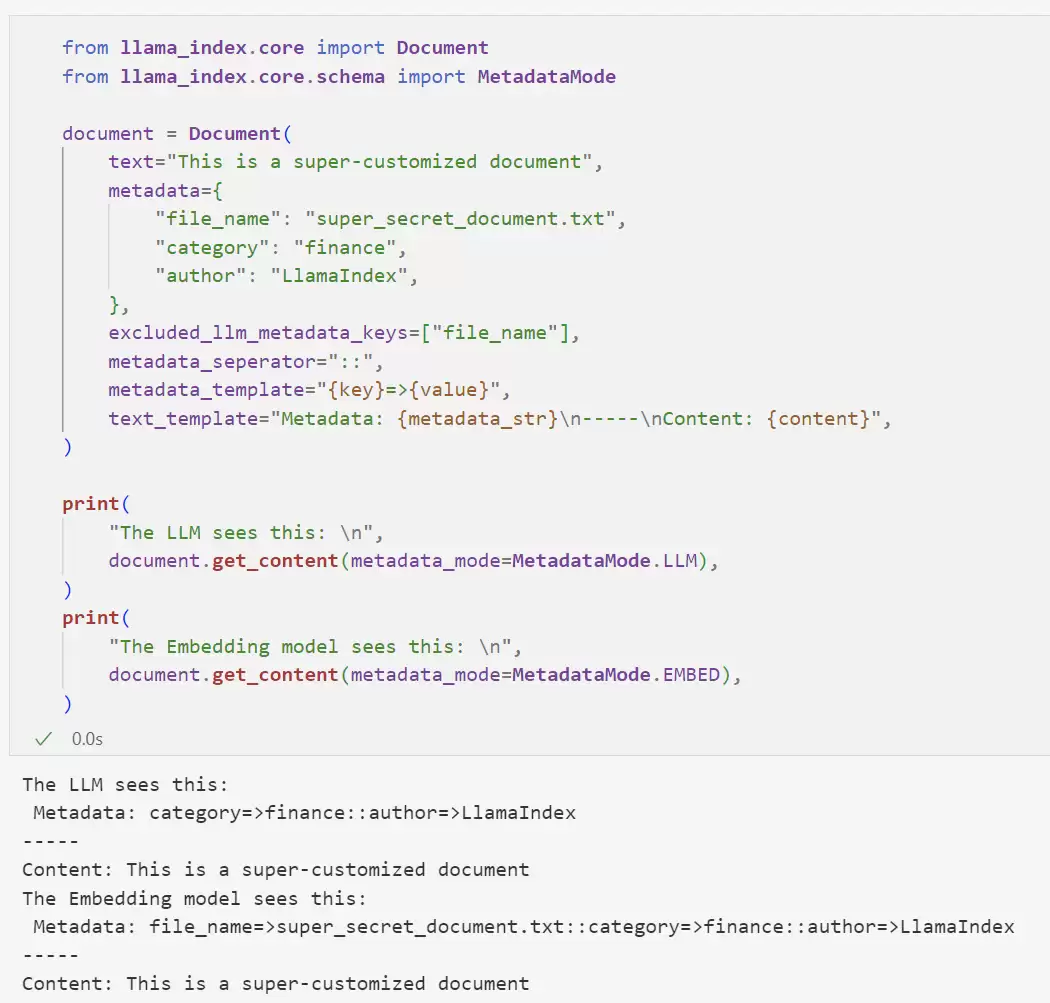
Node
Node 是 LlamaIndex 中的一等公民,代表 Document 的“块”(文本块、图像等)。和 Document 类似,它也包含元数据以及与其他 Node 或索引结构的关系信息。
你可以通过 NodeParser 将 Document 解析为 Node:
from llama_index.core.node_parser import SentenceSplitter

parser = SentenceSplitter()
nodes = parser.get_nodes_from_documents(documents)
也可以直接定义 Node 及其所有属性:
from llama_index.core.schema import TextNode, NodeRelationship, RelatedNodeInfo

node1 = TextNode(text="", id_="")
node2 = TextNode(text="", id_="")
# 设置关系
node1.relationships[NodeRelationship.NEXT] = RelatedNodeInfo(
    node_id=node2.node_id
)
node2.relationships[NodeRelationship.PREVIOUS] = RelatedNodeInfo(
    node_id=node1.node_id
)
nodes = [node1, node2]
RelatedNodeInfo 还可以携带额外的 metadata 信息:
node2.relationships[NodeRelationship.PARENT] = RelatedNodeInfo(
    node_id=node1.node_id, metadata={"key": "val"}
)
每个 Node 都有一个 node_id 属性,如果不指定会自动生成。这个 ID 用途很多:更新存储中的 Node、定义 Node 之间的关系(通过 IndexNode)等等。
print(node.node_id)
node.node_id = "My new node_id!"
-

- 关于宇宙的好的网名有哪些
- 角色扮演 | 1
- 网名