我用Obsidian + Claude Code,打造了一个AI驱动的“第二大脑”
来源:互联网
时间:2026-07-09 13:48:08
# 用AI打造你的第二大脑:Obsidian+Claude Code的完美组合
市面上那些效率工具,确实让人又爱又恨。Notion最后变成了“数字坟墓”,各种数据库漂亮地躺在那里却再也没人碰过;Miro画板看起来很酷,可实际上帮不上什么忙;Apple备忘录更是乱成一锅粥……几乎能想到的工具都试了一遍。
直到某天,突然想明白了一件事——问题的关键不在于去找一个“更好”的笔记应用,而是要换一种思路,构建一个真正能与你协作的系统。说白了,就是**一个真正的“第二大脑”**。
秘密藏在哪儿?把Obsidian本地优先、纯文本的灵活性,和Claude Code实际“操作”文件的能力结合起来。它不是简单地帮你搜文件,也不是把内容总结成几句话给你看,而是能通过编程的方式去操纵、生成和增强这些文件。
嗯,这就是我最终搭建的系统,以及你可以怎么搭建一个。
## 系统架构(其实没你想的那么复杂)
这里有个核心原则:**Obsidian把所有内容都存成了你本地机器上的纯Markdown文件**。没有专有格式,没有云端的锁定,就是一堆`.md`文件。而Claude Code可以直接读取、写入并操作这些文件。
这套三层架构其实很简单:你的Obsidian库(你完全拥有的纯Markdown文件),Claude Code(负责读取、创建并操作这些文件的AI助手),以及最终的产物——“第二大脑”(自动关联的笔记、生成的摘要、智能的任务提取)。
## 搭建基础
先把必需品备齐。假设你已经装好了Obsidian(如果没有,去obsidian.md下载就行,个人使用免费)。
### 安装几个关键插件
在Obsidian里,去“设置”→“社区插件”安装这三个:
- **Tasks**:核心中的核心。允许你在库的任何位置写任务,也能从任何地方查询它们。
- **Templater**:比内置的模板强大得多,可以运行Ja vaScript,动态拉取日期,甚至调用外部API。
- **Data view**:把它想象成你的笔记数据库的SQL查询工具。像查数据库一样查你的库。
就这三个。别掉进插件的“兔子洞”里——这三个插件足够覆盖你90%的需求。
### 设置Claude Code
还没装Claude Code的话,先跑这个:
```
npm install -g @anthropic-ai/claude-code
```
然后,在终端里进到你的Obsidian库目录:
```
cd ~/Documents/ObsidianVault
```
运行Claude Code:
```
claude
```
搞定。现在Claude Code可以访问你整个知识库了。
## 改变一切的几个工作流
接下来这部分是真正让人兴奋的。以下是我每天实际在用的工作流:
### 清晨的“大脑倾倒”
每天早上,打开终端输入:
```
claude "Create today's daily note using my template. Pull in any tasks from yesterday that are still open, and link to any projects I worked on this week."
```
Claude Code会读取你的Templater模板,生成每日笔记,扫描昨天的文件查找未完成的任务,然后给你搭好一天的起点。**以前花15分钟复制粘贴的事情,现在30秒搞定。**
### 会议纪要处理
每次会议结束后,把原始笔记倒进一个文件里。然后:
```
claude "Read my meeting note from today's standup and extract all action items. Format them as Obsidian Tasks with due dates based on what was discussed. Put them in my tasks.md file."
```
它会解析类似“John提到我们需要在周五完成API”这样的内容,然后自动创建:
```
- [ ] Finish API implementation ? 2026-01-10 #work/api
```
Tasks插件随后捕捉这些任务,自动显示在你的每日笔记查询里。完全不用手动格式化。
### 每周回顾
周五下午:
```
claude "Generate my weekly review. Summarize what I worked on based on this week's daily notes, list completed tasks, identify any blocked projects, and suggest priorities for next week."
```
它会生成一个格式化的Markdown文档,真正帮你好好回顾这一周。这不是什么苦差事,而是一个真正的反思工具。
## 模板系统
下面是我每日笔记模板的一部分。Templater处理它,Claude Code则能生成符合相同结构的笔记:
```
# <% tp.date.now("YYYY-MM-DD dddd") %>
## ? 今日焦点 (Today's Focus)
-
## ✅ 任务 (Tasks)
```tasks
not done
due before <% tp.date.now("YYYY-MM-DD") %>
```
```
**小贴士:** 保持模板简洁。真正神奇的地方,不在于多复杂的模板,而在于Claude Code能理解上下文并生成内容,让它自然地融入你现有的结构。
## 为什么它能击败所有其他系统
以前也折腾过Make.com的自动化,写过Python脚本。说几个Obsidian + Claude Code组合真正脱颖而出的原因:
1. **自然语言就是界面。** 不需要记语法、不用翻API文档。直接告诉它你想要什么。
2. **上下文是自动的。** Claude Code会读取你现有的文件。它知道你的命名习惯、你的项目结构、你的偏好——因为所有信息都存在你的库中。
3. **一切都在本地。** 你的笔记永远不会离开你的机器。没有同步问题,没有订阅锁定,更不会有“我们要关停了,赶快导出数据”这种糟心事。
4. **它会不停成长。** 你用得越多,它拥有的上下文就越丰富。你的“第二大脑”会越来越聪明,因为你的知识库在持续增长。
## 今天就开始
给你一个挑战:从**一个**工作流开始。
也许是每日笔记,也许是任务提取。挑一个目前每次需要你花10分钟以上的环节,用Claude Code把它自动化。
然后下周,再加一个。
一个月之后,你会拥有一个不只是存储信息的系统——它会和你协作,帮你找出重要内容,追踪待办事项,连接那些你原本无法独立想到的想法。
那已经不是一个笔记应用了。**那是一个“第二大脑”。**
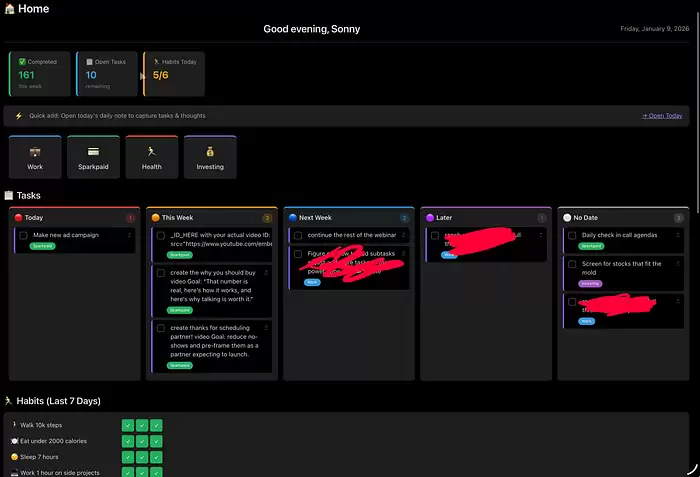
下面是我目前主页构建的一个Data viewJS示例。你可以借用它,但需要改成你实际的文件夹名称——我的是工作、商业、健康和投资。
```
// ============ CONFIG (配置) ============
const habitEmojis = ["?", "?", "?", "?", "?", "?"];
function isHabit(task) {
return habitEmojis.some(emoji => task.text.includes(emoji));
}
const folderLabels = {
"Work": { text: "工作", color: "#3498db", emoji: "?" },
"Business": { text: "商业", color: "#27ae60", emoji: "?" },
"Health": { text: "健康", color: "#e74c3c", emoji: "❤️" },
"Investing": { text: "投资", color: "#9b59b6", emoji: "?" }
};
// ============ HEADER (头部区域) ============
const header = dv.el("div", "");
header.style.cssText = `
display: flex; justify-content: space-between; align-items: center;
margin-bottom: 20px; padding-bottom: 16px;
border-bottom: 1px solid var(--background-modifier-border);
`;
const greeting = header.createDiv();
const hour = new Date().getHours();
const greetText = hour < 12 ? "早上好" : hour < 17 ? "下午好" : "晚上好";
greeting.createEl("h2", {text: `${greetText}, Sonny`}).style.cssText = "margin: 0;";
const dateDiv = header.createDiv();
const today = new Date();
const options = { weekday: 'long', month: 'long', day: 'numeric', year: 'numeric' };
dateDiv.textContent = today.toLocaleDateString('zh-CN', options);
dateDiv.style.cssText = "font-size: 0.9em; opacity: 0.7;";
// ============ STATS ROW (统计行) ============
const statsRow = dv.el("div", "");
statsRow.style.cssText = `display: flex; gap: 12px; margin-bottom: 20px; flex-wrap: wrap;`;
const allTasks = dv.pages().file.tasks;
const thisWeekStart = dv.date("today").minus({days: today.getDay()});
const completedThisWeek = allTasks.where(t => t.completed && !isHabit(t)).length;
const openTasks = allTasks.where(t => !t.completed && !isHabit(t)).length;
const dailyNotes = dv.pages('"Daily Journal"')
.where(p => p.file.name.match(/^\d{4}-\d{2}-\d{2}$/))
.sort(p => p.file.name, 'desc')
.limit(7);
let habitsDoneToday = 0;
let habitsTotal = 6;
const todayStr = dv.date("today").toFormat("yyyy-MM-dd");
for (const note of dailyNotes) {
if (note.file.name === todayStr) {
const habits = note.file.tasks.where(t => isHabit(t));
habitsDoneToday = habits.where(t => t.completed).length;
habitsTotal = habits.length || 6;
break;
}
}
function createStatCard(emoji, label, value, subtext, color) {
const card = statsRow.createDiv();
card.style.cssText = `background: var(--background-secondary); padding: 14px 18px; border-radius: 8px; min-width: 140px; border-left: 4px solid ${color};`;
card.createDiv({text: `${emoji} ${label}`}).style.cssText = "font-size: 0.8em; opacity: 0.7; margin-bottom: 4px;";
card.createDiv({text: value}).style.cssText = `font-size: 1.4em; font-weight: bold; color: ${color};`;
if (subtext) card.createDiv({text: subtext}).style.cssText = "font-size: 0.75em; opacity: 0.5;";
}
createStatCard("✅", "已完成", completedThisWeek.toString(), "本周", "#27ae60");
createStatCard("?", "开放任务", openTasks.toString(), "剩余", "#3498db");
createStatCard("?", "今日习惯", `${habitsDoneToday}/${habitsTotal}`, "", habitsDoneToday >= habitsTotal ? "#27ae60" : "#f39c12");
// ============ QUICK ADD (快速添加) ============
const quickSection = dv.el("div", "");
quickSection.style.cssText = `background: var(--background-secondary); padding: 12px 16px; border-radius: 8px; margin-bottom: 20px; display: flex; gap: 8px; align-items: center;`;
quickSection.createSpan({text: "⚡"}).style.marginRight = "4px";
const quickNote = quickSection.createSpan({text: "快速添加:打开今日每日笔记,记录任务和想法"});
quickNote.style.cssText = "flex: 1; font-size: 0.85em; opacity: 0.7;";
const todayLink = quickSection.createEl("a", {text: "→ 打开今日笔记"});
todayLink.style.cssText = "font-size: 0.85em; cursor: pointer;";
todayLink.onclick = () => app.workspace.openLinkText(`Daily Journal/${todayStr}`, "", false);
// ============ FOLDER SHORTCUTS (文件夹快捷方式) ============
const shortcutsSection = dv.el("div", "");
shortcutsSection.style.cssText = `display: flex; gap: 12px; margin-bottom: 24px; flex-wrap: wrap;`;
for (const [folder, info] of Object.entries(folderLabels)) {
const card = shortcutsSection.createDiv();
card.style.cssText = `background: var(--background-secondary); padding: 16px 20px; border-radius: 8px; cursor: pointer; transition: transform 0.1s; border-top: 3px solid ${info.color}; min-width: 120px; text-align: center;`;
card.onmouseenter = () => card.style.transform = "translateY(-2px)";
card.onmouselea ve = () => card.style.transform = "translateY(0)";
card.onclick = () => app.workspace.openLinkText(folder, "", false);
card.createDiv({text: info.emoji}).style.cssText = "font-size: 1.5em; margin-bottom: 6px;";
card.createDiv({text: info.text}).style.cssText = "font-size: 0.9em; font-weight: 500;";
}
// ============ TASKS KANBAN (任务看板) ============
const kanbanTitle = dv.el("h3", "? 任务");
kanbanTitle.style.cssText = "margin: 0 0 12px 0;";
const dvToday = dv.date("today");
const jsToday = new Date();
const dayOfWeek = jsToday.getDay();
const thisWeekEnd = dvToday.plus({days: 6 - dayOfWeek});
const nextWeekEnd = thisWeekEnd.plus({days: 7});
const tasks = dv.pages().file.tasks.where(t => !t.completed && !isHabit(t));
const todayTasks = tasks.filter(t => { if (!t.due) return false; return t.due.ts <= dvToday.ts || t.text.includes("?R") });
const thisWeekTasks = tasks.filter(t => { if (!t.due) return false; return t.due.ts > dvToday.ts && t.due.ts <= thisWeekEnd.ts; });
const nextWeekTasks = tasks.filter(t => { if (!t.due) return false; return t.due.ts > thisWeekEnd.ts && t.due.ts <= nextWeekEnd.ts; });
const laterTasks = tasks.filter(t => { if (!t.due) return false; return t.due.ts > nextWeekEnd.ts; });
const noDueTasks = tasks.filter(t => !t.due);
const kanban = dv.el("div", "");
kanban.style.cssText = `display: flex; gap: 12px; margin-bottom: 24px; overflow-x: auto; padding-bottom: 8px;`;
function getLabel(task) {
for (const [folder, info] of Object.entries(folderLabels)) {
if (task.path.includes(folder)) return info;
}
return null;
}
async function completeTask(task) {
const file = app.vault.getAbstractFileByPath(task.path);
if (!file) return;
const content = await app.vault.read(file);
const lines = content.split("\n");
if (lines[task.line]) {
const todayDate = new Date().toISOString().split('T')[0];
lines[task.line] = lines[task.line].replace("- [ ]", "- [x]").replace(/$/, ` ✅ ${todayDate}`);
await app.vault.modify(file, lines.join("\n"));
}
}
function renderColumn(container, title, color, taskList) {
const col = container.createDiv();
col.style.cssText = `flex: 1; min-width: 220px; max-width: 300px; background: var(--background-secondary); border-radius: 8px; padding: 12px; border-top: 3px solid ${color};`;
const colHeader = col.createDiv();
colHeader.style.cssText = "display: flex; justify-content: space-between; margin-bottom: 10px;";
colHeader.createEl("h4", {text: title}).style.cssText = "margin: 0; font-size: 0.9em;";
colHeader.createSpan({text: taskList.length.toString()}).style.cssText = `background: ${color}33; color: ${color}; padding: 2px 8px; border-radius: 10px; font-size: 0.75em;`;
const list = col.createDiv();
list.style.cssText = "max-height: 40vh; overflow-y: auto;";
if (taskList.length === 0) {
const empty = list.createDiv({text: "暂无任务"});
empty.style.cssText = "color: var(--text-muted); font-size: 0.85em; padding: 8px; text-align: center;";
} else {
for (const task of taskList) {
const item = list.createDiv();
item.style.cssText = `background: var(--background-primary); padding: 8px 10px; margin-bottom: 6px; border-radius: 5px; font-size: 0.85em; border-left: 3px solid var(--interactive-accent);`;
const topRow = item.createDiv();
topRow.style.cssText = "display: flex; align-items: flex-start; gap: 8px;";
const checkbox = topRow.createEl("input", {type: "checkbox"});
checkbox.style.cssText = "margin-top: 2px; cursor: pointer;";
checkbox.onclick = async (e) => { e.preventDefault(); item.style.opacity = "0.5"; item.style.textDecoration = "line-through"; await completeTask(task); };
const text = task.text.replace(/[?⏫?✅]\s*\d{4}-\d{2}-\d{2}/g, "").replace(/[?⏫?✅]/g, "").trim();
topRow.createSpan({text}).style.cssText = "flex: 1;";
if (task.link) { const link = topRow.createEl("a", {text: "↗"}); link.style.cssText = "font-size: 0.75em; opacity: 0.5; cursor: pointer;"; link.onclick = (e) => { e.preventDefault(); app.workspace.openLinkText(task.link.path, "", false); }; }
const label = getLabel(task);
if (label) { const labelSpan = item.createSpan({text: label.text}); labelSpan.style.cssText = `display: inline-block; margin-top: 6px; margin-left: 22px; padding: 2px 8px; font-size: 0.65em; background: ${label.color}; color: white; border-radius: 10px;`; }
}
}
}
renderColumn(kanban, "? 今日", "#e74c3c", todayTasks.array());
renderColumn(kanban, "? 本周", "#f39c12", thisWeekTasks.array());
renderColumn(kanban, "? 下周", "#3498db", nextWeekTasks.array());
renderColumn(kanban, "? 稍后", "#9b59b6", laterTasks.array());
renderColumn(kanban, "⚪ 无日期", "#95a5a6", noDueTasks.array());
// ============ HABITS STREAK (习惯连胜) ============
const habitsTitle = dv.el("h3", "? 习惯 (最近7天)");
habitsTitle.style.cssText = "margin: 0 0 12px 0;";
const habits = [
{name: "步行1万步", emoji: "?"},
{name: "饮食控制在2000卡路里以内", emoji: "?"},
{name: "睡眠7小时", emoji: "?"},
{name: "副业工作1小时", emoji: "?"},
{name: "刷牙 (早上)", emoji: "?"},
{name: "刷牙 (晚上)", emoji: "?"}
];
const habitsContainer = dv.el("div", "");
habitsContainer.style.cssText = `background: var(--background-secondary); padding: 16px; border-radius: 8px; margin-bottom: 24px;`;
for (const habit of habits) {
const row = habitsContainer.createDiv();
row.style.cssText = "display: flex; align-items: center; gap: 12px; margin-bottom: 8px;";
const label = row.createSpan({text: `${habit.emoji} ${habit.name}`});
label.style.cssText = "width: 240px; font-size: 0.85em;";
const dots = row.createDiv();
dots.style.cssText = "display: flex; gap: 4px;";
const notesReversed = [...dailyNotes].reverse();
for (const note of notesReversed) {
const dot = dots.createDiv();
dot.style.cssText = `width: 28px; height: 28px; border-radius: 4px; display: flex; align-items: center; justify-content: center; font-size: 0.7em;`;
const tasks = note.file.tasks.where(t => t.text.includes(habit.name));
if (tasks.length === 0) { dot.style.background = "var(--background-primary)"; dot.textContent = "—"; dot.style.opacity = "0.3"; }
else if (tasks[0].completed) { dot.style.background = "#27ae60"; dot.textContent = "✓"; dot.style.color = "white"; }
else { dot.style.background = "#e74c3c"; dot.textContent = "✗"; dot.style.color = "white"; }
dot.title = note.file.name;
}
}
// ============ RECENT NOTES (近期笔记) ============
const recentTitle = dv.el("h3", "? 近期笔记");
recentTitle.style.cssText = "margin: 0 0 12px 0;";
const recentNotes = dv.pages()
.where(p => !p.file.path.includes(".obsidian") && !p.file.name.match(/^\d{4}-\d{2}-\d{2}$/))
.sort(p => p.file.mtime, 'desc')
.limit(5);
const recentContainer = dv.el("div", "");
recentContainer.style.cssText = `background: var(--background-secondary); border-radius: 8px; overflow: hidden;`;
for (const note of recentNotes) {
const row = recentContainer.createDiv();
row.style.cssText = `padding: 10px 14px; cursor: pointer; border-bottom: 1px solid var(--background-modifier-border); display: flex; justify-content: space-between; align-items: center;`;
row.onmouseenter = () => row.style.background = "var(--background-primary)";
row.onmouselea ve = () => row.style.background = "transparent";
row.onclick = () => app.workspace.openLinkText(note.file.path, "", false);
row.createSpan({text: note.file.name}).style.cssText = "font-size: 0.9em;";
const folder = note.file.folder || "根目录";
const folderSpan = row.createSpan({text: folder});
folderSpan.style.cssText = "font-size: 0.75em; opacity: 0.5;";
}