
HR简历筛选助手Agent:打造高效智能招聘流程
推荐语:智能 HR 简历筛选助手,优化招聘流程,结合代码详细剖析!
核心内容:
1. HR 简历筛选面临的挑战
2. 助手 Agent 工作流程概述
3. 每步进程的详细解析与代码示例
在如今竞争激烈的人才市场中,HR需要筛选大量简历,快速找到合适的候选人,这对效率和精准度提出了更高要求。引入智能Agent后,整个流程的革命性优化就水到渠成了。本文结合实际代码,来详细拆解HR简历筛选助手Agent的工作流程,看看它如何在简历筛选中脱颖而出。
一、流程概述
整个流程可以分为两大块:
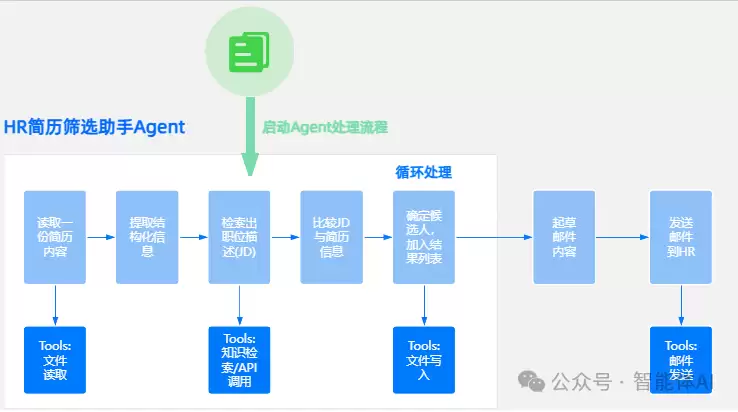
- 启动Agent处理流程:自动读取简历、提取信息、初步筛选,一气呵成。
- 循环处理流程:筛选出符合要求的候选人,并通过邮件通知HR,实现全流程闭环。
下面会逐步拆解每一个环节,配上代码示例,带你深入了解这套智能化流程的核心实现。
二、每步进程详解
1. 自动读取简历内容:解锁文本数据
简历通常是PDF或Word格式,要让Agent读懂简历,第一步就是提取文本内容。
- 工具:文件读取(File Reader)
- 核心功能:解析简历文件,提取文本数据。
代码示例:
import PyPDF2

def read_file(file_path):
    try:
        with open(file_path, 'rb') as file:
            reader = PyPDF2.PdfReader(file)
            content = ""
            for page in reader.pages:
                content += page.extract_text()
            return content
    except Exception as e:
        print("文件读取错误:", e)
        return None

# 假设简历为PDF文件
resume_path = "./resumes/candidate1.pdf"
resume_content = read_file(resume_path)
print("简历内容:", resume_content)
这段代码把简历文本解析出来并存入内存,后续操作就有了原材料。
2. 提取构件信息:让数据变得有结构
从简历文本中提取关键信息——姓名、年龄、学历等——是后续分析的基础。
- 工具:知识推理API调用
- 核心功能:将非结构化文本转化为结构化数据。
代码示例:
import re

def extract_info(resume_text):
    try:
        name = re.search(r"姓名[::]\s*(\w+)", resume_text).group(1)
        age = re.search(r"年龄[::]\s*(\d+)", resume_text).group(1)
        degree = re.search(r"学历[::]\s*(\w+)", resume_text).group(1)
        experience = re.search(r"工作经验[::]\s*(\d+年)", resume_text).group(1)
        return {
            "name": name,
            "age": age,
            "degree": degree,
            "experience": experience
        }
    except Exception as e:
        print("信息提取错误:", e)
        return None

# 提取简历中的关键信息
structured_data = extract_info(resume_content)
print("提取的信息:", structured_data)
通过正则表达式,Agent能快速抓取HR关心的字段,效率大幅提升。
3. 检测重复简历:避免无效工作
重复简历既浪费时间又干扰筛选结果,所以需要在数据库中检查是否已有相同简历。
- 工具:数据库查询
- 核心功能:避免重复处理,提高筛选效率。
代码示例:
existing_ids = {"12345", "67890"}

def check_duplicate(candidate_id):
    return candidate_id in existing_ids

# 假设每份简历有唯一的ID
candidate_id = "12345"  # 示例ID
is_duplicate = check_duplicate(candidate_id)
if is_duplicate:
    print("发现重复简历,跳过处理。")
else:
    print("简历是新的,继续处理。")
这个功能确保每份简历都被高效管理,避免重复劳动。
4. 匹配职位要求:精准筛选候选人
根据职位要求,用规则匹配算法筛选出符合条件的候选人。
- 工具:规则匹配算法
- 核心功能:快速剔除不符合要求的简历。
代码示例:
def match_criteria(candidate_data, job_criteria):
    try:
        experience_years = int(re.search(r"\d+", candidate_data["experience"]).group())
        return (
            experience_years >= job_criteria["experience"] and
            candidate_data["degree"] == job_criteria["degree"]
        )
    except Exception as e:
        print("匹配错误:", e)
        return False

# 职位要求的条件
job_criteria = {"experience": 3, "degree": "Bachelor"}
match_result = match_criteria(structured_data, job_criteria)

if match_result:
    print("候选人符合要求。")
else:
    print("候选人不符合要求,移除。")
这个环节能准确锁定合适的候选人,节省HR的筛选时间。
5. 保存筛选结果:形成合规名单
符合条件的候选人信息被保存到合规表里,供HR后续查看和跟进。
- 工具:文件写入(File Writer)
- 核心功能:结构化保存数据。
代码示例:
import csv

def write_to_file(file_path, candidate_data):
    try:
        with open(file_path, mode="a", newline="", encoding="utf-8") as file:
            writer = csv.DictWriter(file, fieldnames=["name", "age", "degree", "experience"])
            writer.writerow(candidate_data)
        print("已将候选人信息添加到合规表。")
    except Exception as e:
        print("写入错误:", e)

# 合规表路径
compliance_file = "./results/compliance_list.csv"
write_to_file(compliance_file, structured_data)
这个环节把筛选结果落地,形成明确的候选人名单。
6. 邮件通知HR:智能生成通知内容
为了进一步节省HR的时间,Agent会自动生成邮件内容,把筛选结果通知出去。
- 工具:邮件模板生成器
- 核心功能:生成清晰、专业的邮件内容。
代码示例:
def generate_email(to_email, candidate_data):
    subject = f"候选人推荐:{candidate_data['name']}"
    body = (
        f"尊敬的HR,\n\n推荐候选人信息如下:\n"
        f"姓名:{candidate_data['name']}\n"
        f"年龄:{candidate_data['age']}\n"
        f"学历:{candidate_data['degree']}\n"
        f"工作经验:{candidate_data['experience']}\n\n"
        f"请尽快联系候选人。"
    )
    return subject, body

# 生成邮件内容
to_email = "hr@company.com"
email_subject, email_body = generate_email(to_email, structured_data)
print("生成的邮件内容:")
print("主题:", email_subject)
print("正文:", email_body)
自动生成的邮件内容,让HR能快速接收筛选结果,不用手动整理。
7. 发送邮件:让信息无缝传递
最后一步,通过邮件发送工具,把筛选结果真正传到HR手里。
- 工具:邮件发送(Email Sender)
- 核心功能:实现结果的快速传递。
代码示例:
import smtplib
from email.mime.text import MIMEText

def send_email(to_email, subject, body):
    try:
        from_email = "your_email@example.com"
        password = "your_password"

        msg = MIMEText(body, "plain", "utf-8")
        msg["Subject"] = subject
        msg["From"] = from_email
        msg["To"] = to_email

        with smtplib.SMTP_SSL("smtp.example.com", 465) as server:
            server.login(from_email, password)
            server.sendmail(from_email, to_email, msg.as_string())
        print("邮件已发送至HR。")
    except Exception as e:
        print("邮件发送失败:", e)

# 发送邮件
send_email(to_email, email_subject, email_body)
这个功能确保了筛选结果能迅速传递给HR,完成闭环流程。
三、工具总结
- 文件读取(File Reader):解析简历文件内容。
- 知识推理API(Knowledge Extraction API):提取关键字段。
- 文件写入(File Writer):保存筛选结果。
- 邮件发送(Email Sender):快速通知HR。
四、总结
HR简历筛选助手Agent通过自动化技术,极大提升了简历筛选的效率和精准度。从简历读取到邮件通知,每一步都实现了高度智能化。结合上面的代码示例,相信你对如何构建这样的智能Agent已经有了清晰的认识。未来,借助类似的智能工具,HR工作将变得更加高效便捷,为企业的人才管理带来更多可能性。
