
AI+Decodo:构建智能电商价格监控系统的完整实战指南
要说现在做电商,价格监控基本是绕不开的话题。不管是商家想盯着竞品调价,还是消费者等着捡漏,都需要一套靠谱的监控系统。但传统的爬虫路子,如今是越来越不好走了——反爬机制一天比一天严,页面结构变得比翻书还快,IP动不动就被封。今天我们就来聊聊,怎么结合AI和高质量袋里池,搭一个真正能打的电商价格监控系统。
一、技术背景与挑战分析
1.1 传统爬虫的痛点
传统的爬虫到底有多难?这么说吧,三座大山摆在那儿。
- :IP频繁访问就被封,User-Agent也被识别拦截,数据还没拿到手,先被网站请出去了。
网络访问层面的限制越来越变态
- :内容靠Ja vaScript动态渲染,结构说改就改,传统那种写死解析规则的做法,基本行不通了。
页面结构变得越来越“活”
- :价格格式千奇百怪,库存状态的表达方式更是五花八门,不同平台的数据差异大到离谱,没有点智能识别能力根本搞不定。
数据提取的多样性让人头大
一句话,不同平台的呈现方式差异巨大,需要更聪明的解析手段才能应付。
1.2 解决方案架构
针对这些问题,我们设计了一套“AI + 袋里池”的智能抓取架构,逻辑链条是这样的:
[目标网站] ← [高质量袋里池] ← [智能请求管理] ← [AI内容分析] ← [结构化输出]核心设计思路非常清晰:
- 袋里池负责“穿马甲”——管理网络身份,实现IP轮换和访问伪装
- AI负责“看得懂”——理解页面内容,智能识别和提取关键信息
网络访问和内容分析彻底分离,各干各的活儿,系统的稳定性和智能化水平一下就上去了。
二、实战开发:构建智能监控系统
2.1 环境准备与核心依赖
先把基础工具备齐。通过pip安装相关库,项目构建需要的技术栈大概是这样的:
# 核心依赖包
import requests                        # HTTP请求处理
from bs4 import BeautifulSoup          # HTML解析
import openai                          # AI模型调用
from loguru import logger              # 智能日志
import pandas as pd                    # 数据处理
import urllib3                         # 网络优化
from typing import Optional, Dict, List
import re
import json
import random
import time
import datetime
几个关键的配置优化也值得注意:
# 屏蔽SSL证书警告,提高请求成功率
urllib3.disable_warnings(urllib3.exceptions.InsecureRequestWarning)

# 配置智能日志系统
logger.add("price_monitor.log", rotation="1 day", level="INFO")
这些配置看着不起眼,实际能减少不少网络请求中的干扰因素,系统稳不稳,很多时候就靠这些细节。
2.2 Decodo袋里池管理核心实现
袋里池是整个系统的网络根基。我们选的是Decodo作为袋里服务提供商,它有几个硬实力的优势:
- :有效规避识别,不容易被盯上
高匿名度IP
- :可以灵活切换访问来源
多地域节点覆盖
袋里节点分布在不同的端口上,还支持动态切换。一旦某个袋里响应变慢或者连接失败,系统会自动把它从可用列表里摘掉,确保每次请求用的都是状态最好的袋里。
获取Decodo袋里的步骤也不复杂。先注册Decodo平台的账户,然后在控制台左侧导航栏找到“静态住宅袋里”。在页面上方选择“按 IP 付费”(跟少数用户共享的IP)这一选项。
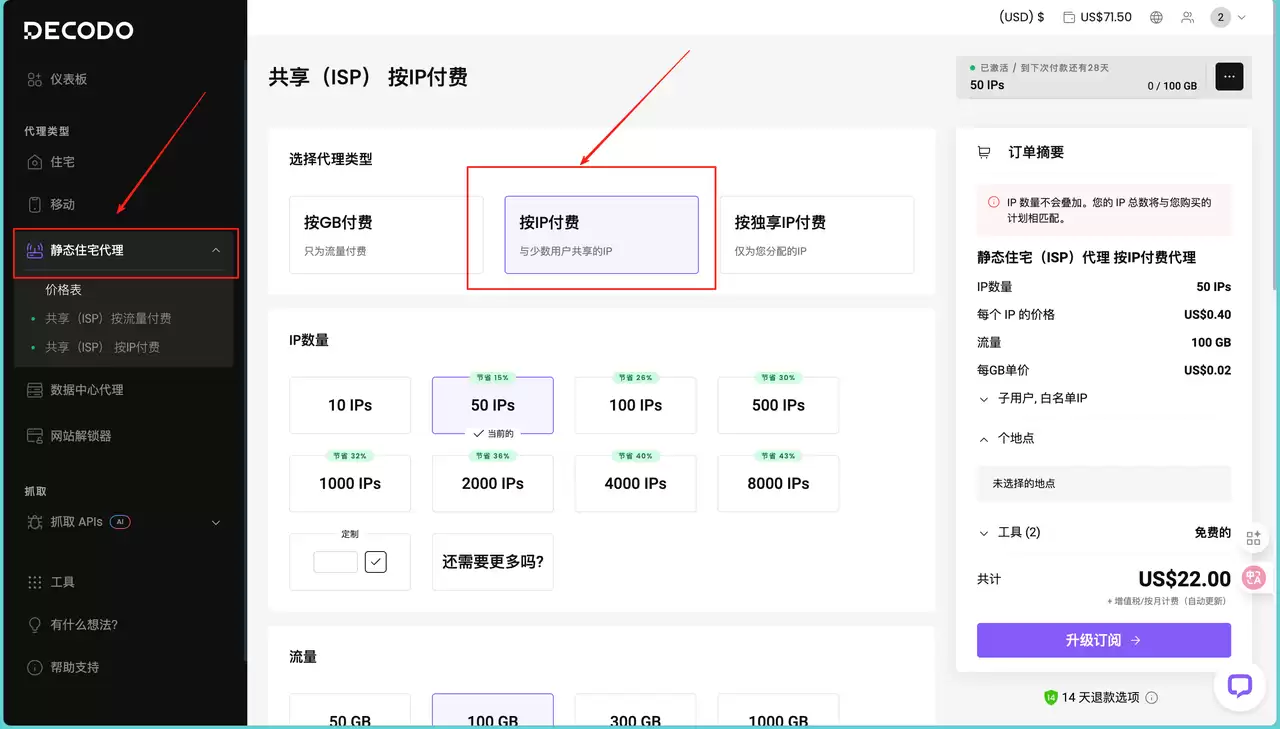
接下来在“IP数量”板块,根据自己的需求选择预设数量。因为下面项目里需要的IP不算多,所以只选了50个。当然,也支持定制输入自定义数量。同理,“流量”板块也是按需选择即可。
右侧的“订单摘要”会实时显示配置的费用明细。确认IP数量、流量、单价都没问题之后,点订阅就完成了。之后会跳转到刚才购买的界面,上面直接给出需要的袋里地址、用户名和密码:
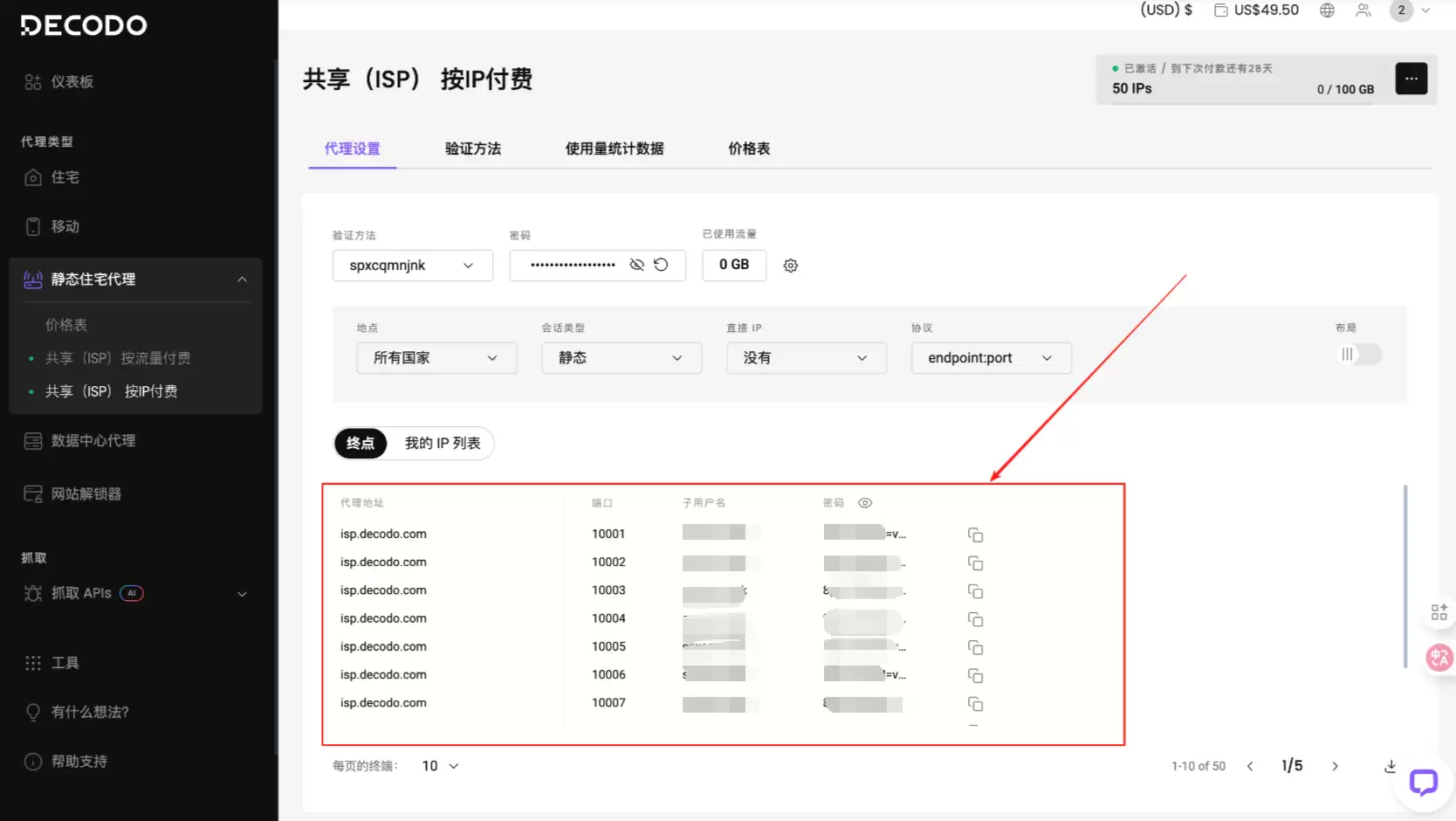
把用户名、密码等信息填入代码,格式参考下面(这里不展示所有用户,大家按这个格式配置自己的就行):
url = 'https://ip.decodo.com/json'
username = '填入自己的'
password = '填入自己的'
proxy = f"http://{username}:{password}@isp.decodo.com:10001"
class SimpleProxyManager:
    """基于Decodo的智能袋里管理器"""
    def __init__(self):
        # Decodo袋里配置 – 多端口负载均衡
        base_url = "http://spxcqmnjnk:8pUFd76rM=vgmVee6o@isp.decodo.com"
        ports = [10001, 10002, 10003, 10004]
        self.proxies = [
            {"http": f"{base_url}:{port}", "https": f"{base_url}:{port}"}
            for port in ports
        ]
        self.current_index = 0

    def get_proxy(self) -> Optional[Dict]:
        """智能袋里获取 - 轮询算法"""
        if not self.proxies:
            return None
        proxy = self.proxies[self.current_index]
        self.current_index = (self.current_index + 1) % len(self.proxies)
        return proxy

    def remove_proxy(self, proxy: Dict):
        """失效袋里自动移除"""
        if proxy in self.proxies:
            self.proxies.remove(proxy)
            logger.warning(f"移除失效袋里: {proxy}")
袋里管理的核心设计就两个要点:轮询机制避免单点过载,失效袋里实时清理。通过智能化的袋里调度,系统的可用性和稳定性就有了基本保障。
2.3 AI内容分析引擎
这是整个系统的“大脑”,负责理解复杂的电商页面结构。AI分析的关键优势在于:能智能识别页面的主要内容,自动过滤广告和无关信息。模型能理解页面的语义结构,准确提取商品核心信息。
给大模型设好专属提示词是关键。提示词设得越明确,AI的输出就越精准,无效输出也就越少。下面是完整的工具类代码,已经针对OpenAI API版本兼容和密钥安全配置做了优化:
import os
import re
import json
from bs4 import BeautifulSoup
from openai import OpenAI  # 适配新版OpenAI SDK(v1.0.0+)
from dotenv import load_dotenv  # 用于安全加载环境变量,避免密钥硬编码
from loguru import logger
from typing import Dict

# 先加载环境变量(建议在项目根目录创建.env文件存储敏感信息)
load_dotenv()

class AIAnalyzer:
    """基于GPT的智能内容分析器,专注电商页面商品信息提取"""
    def __init__(self):
        """初始化OpenAI客户端,提前校验API密钥配置"""
        # 从环境变量获取API密钥,而非直接写在代码里,降低泄露风险
        self.openai_api_key = os.getenv("OPENAI_API_KEY")
        if not self.openai_api_key:
            raise ValueError("请先配置OpenAI API密钥!可在.env文件中添加'OPENAI_API_KEY=你的密钥',或设置系统环境变量")
        # 初始化新版OpenAI客户端
        self.client = OpenAI(api_key=self.openai_api_key)
        logger.info("OpenAI客户端初始化完成,已准备好进行商品信息分析")

    def extract_product_info(self, html_content: str, url: str) -> Dict:
        """使用AI智能提取商品信息
        :param html_content: 电商页面的HTML源代码
        :param url: 对应页面的URL(用于辅助AI理解上下文)
        :return: 包含商品信息的字典,或错误提示
        """
        # 第一步:HTML内容预处理——移除无关元素,减少AI分析干扰
        soup = BeautifulSoup(html_content, 'html.parser')
        # 剔除脚本、样式、导航栏等非商品核心内容
        for tag in soup(['script', 'style', 'na v', 'footer', 'header', 'aside']):
            tag.decompose()
        # 提取纯文本并控制长度(避免超出AI tokens限制)
        text_content = soup.get_text(separator=' ', strip=True)
        if len(text_content) > 3000:
            text_content = text_content[:3000] + "...(内容过长,已截取前3000字符)"
        logger.debug(f"预处理后待分析文本长度:{len(text_content)}字符")

        # 第二步:构建精准提示词——明确AI任务边界和输出格式
        prompt = f"""
请分析以下电商页面内容,提取商品信息。返回JSON格式:
网页URL: {url}
网页内容: {text_content}
请提取:
1. product_name: 商品名称
2. current_price: 当前价格(只要数字,去掉货币符号)
3. original_price: 原价(如果有)
4. stock_status: 库存状态
5. is_a vailable: 是否有货(true/false)
只返回JSON,不要其他文字。
"""
        try:
            # 第三步:调用OpenAI API——使用新版接口格式
            response = self.client.chat.completions.create(
                model="gpt-3.5-turbo",  # 平衡效果与成本,也可替换为"gpt-4"提升精度
                messages=[
                    {"role": "system", "content": "你是专注于电商数据提取的工具,输出仅JSON,无多余内容"},
                    {"role": "user", "content": prompt}
                ],
                temperature=0.1,  # 降低随机性,确保输出格式稳定
                max_tokens=300,   # 限制输出长度,避免冗余
                timeout=10        # 设置超时时间,防止长期阻塞
            )
            # 提取AI响应内容并解析JSON
            result_text = response.choices[0].message.content.strip()
            # 用正则匹配JSON结构(防止AI偶尔多输出文字)
            json_match = re.search(r'{[sS]*}', result_text, re.DOTALL)
            if json_match:
                result = json.loads(json_match.group())
                # 补充URL字段,方便后续追溯数据来源
                result["source_url"] = url
                logger.success(f"成功提取商品信息:{result.get('product_name', '未知商品')}(来自{url})")
                return result
            else:
                logger.error(f"AI返回内容格式错误,未匹配到JSON:{result_text[:150]}...")
                return {"error": "AI返回格式错误", "source_url": url, "raw_response": result_text[:200]}
        except Exception as e:
            error_msg = f"商品信息提取失败:{str(e)}"
            logger.error(f"{error_msg}(URL:{url})")
            return {"error": error_msg, "source_url": url}
需要的OpenAI API密钥需要自己去官网注册,进入API Keys页面创建新密钥。记得设置合理的使用限额,避免超支。这里使用的GPT-3.5-turbo价格大约是$0.002/1K tokens,成本相对可控。

2.4 智能请求管理与重试机制
把袋里池和AI分析结合起来,构建智能的网页获取系统:
def fetch_page(self, url: str, max_retries: int = 3) -> tuple[str, bool]:
    """智能网页获取,包含重试和袋里切换"""
    for attempt in range(max_retries):
        proxy = self.proxy_manager.get_proxy()
        # 袋里池耗尽时的降级策略
        if not proxy:
            logger.warning("没有可用袋里,尝试直接连接")
            proxy = None
        try:
            response = self.session.get(
                url,
                proxies=proxy,
                timeout=(5, 20),  # 连接超时5秒,读取超时20秒
                verify=False
            )
            if response.status_code == 200:
                logger.info(f"成功获取页面: {url}")
                return response.text, True
            elif response.status_code in [403, 429, 503]:
                logger.warning(f"访问受限 {response.status_code}, 更换袋里重试")
                if proxy:
                    self.proxy_manager.remove_proxy(proxy)
        except requests.exceptions.ReadTimeout:
            logger.warning(f"读取超时,尝试更换袋里 (尝试 {attempt + 1}/{max_retries})")
            if proxy:
                self.proxy_manager.remove_proxy(proxy)
        except Exception as e:
            logger.error(f"请求异常: {str(e)}")
            if proxy:
                self.proxy_manager.remove_proxy(proxy)
        # 指数退避重试策略
        delay = random.uniform(2 + attempt * 2, 5 + attempt * 2)
        logger.info(f"等待 {delay:.1f} 秒后重试...")
        time.sleep(delay)
    return "", False
智能重试的核心特性有两个:一是根据HTTP状态码判断问题类型,二是用指数退避策略避免频繁重试。这种机制能有效应对各种网络异常,大幅提升整体成功率。
2.5 完整的监控流程实现
把前面所有组件整合到一起,就构成了完整的商品监控流程:
def monitor_product(self, url: str) -> Dict:
    """单个商品完整监控流程"""
    logger.info(f"开始监控商品: {url}")

    # 步骤1:通过袋里获取页面内容
    html_content, success = self.fetch_page(url)
    if not success:
        return {
            "url": url,
            "success": False,
            "error": "无法获取页面内容",
            "timestamp": datetime.now().strftime('%Y-%m-%d %H:%M:%S')
        }

    # 步骤2:AI分析提取信息
    product_info = self.ai_analyzer.extract_product_info(html_content, url)
    if "error" in product_info:
        return {
            "url": url,
            "success": False,
            "error": product_info["error"],
            "timestamp": datetime.now().strftime('%Y-%m-%d %H:%M:%S')
        }

    # 步骤3:数据处理和结构化
    current_price = self._extract_price(product_info.get('current_price'))
    original_price = self._extract_price(product_info.get('original_price'))

    result = {
        "url": url,
        "success": True,
        "product_name": product_info.get('product_name', ''),
        "current_price": current_price,
        "original_price": original_price,
        "stock_status": product_info.get('stock_status', ''),
        "is_a vailable": product_info.get('is_a vailable', False),
        "discount": self._calculate_discount(original_price, current_price),
        "timestamp": datetime.now().strftime('%Y-%m-%d %H:%M:%S')
    }
    logger.success(f"监控成功: {result['product_name']} - ¥{current_price}")
    return result
这个监控流程的优势很明显:网络层和分析层职责清晰分离,完整的错误处理和日志记录贯穿始终。每个环节都有详细的状态跟踪,不管是定位问题还是后续优化,都方便得多。
三、运行结果与性能分析
3.1 完整的工作流程
创建一个 PriceMonitor 主类,把袋里管理、AI分析、网页抓取等功能模块有机整合,就形成了一个完整的工作闭环。现在,只需要配置好Decodo袋里和OpenAI API密钥,就能立刻开始监控心仪商品的价格变化。整个系统的代码结构如下:
class PriceMonitor:
    """完整的价格监控系统主类"""
    def __init__(self):
        """初始化监控系统"""
        self.proxy_manager = SimpleProxyManager()
        self.ai_analyzer = AIAnalyzer()

        # 配置请求会话
        self.session = requests.Session()
        self.session.headers.update({
            'User-Agent': 'Mozilla/5.0 (Windows NT 10.0; Win64; x64) AppleWebKit/537.36 (KHTML, like Gecko) Chrome/91.0.4472.124 Safari/537.36',
            'Accept': 'text/html,application/xhtml+xml,application/xml;q=0.9,image/webp,*/*;q=0.8',
            'Accept-Language': 'zh-CN,zh;q=0.9,en;q=0.8',
            'Accept-Encoding': 'gzip, deflate',
            'Connection': 'keep-alive',
        })
        logger.info("价格监控系统初始化完成")

    def fetch_page(self, url: str, max_retries: int = 3) -> tuple[str, bool]:
        """智能网页获取,包含重试和袋里切换"""
        for attempt in range(max_retries):
            proxy = self.proxy_manager.get_proxy()
            # 袋里池耗尽时的降级策略
            if not proxy:
                logger.warning("没有可用袋里,尝试直接连接")
                proxy = None
            try:
                response = self.session.get(
                    url,
                    proxies=proxy,
                    timeout=(5, 20),  # 连接超时5秒,读取超时20秒
                    verify=False
                )
                if response.status_code == 200:
                    logger.info(f"成功获取页面: {url}")
                    return response.text, True
                elif response.status_code in [403, 429, 503]:
                    logger.warning(f"访问受限 {response.status_code}, 更换袋里重试")
                    if proxy:
                        self.proxy_manager.remove_proxy(proxy)
            except requests.exceptions.ReadTimeout:
                logger.warning(f"读取超时,尝试更换袋里 (尝试 {attempt + 1}/{max_retries})")
                if proxy:
                    self.proxy_manager.remove_proxy(proxy)
            except Exception as e:
                logger.error(f"请求异常: {str(e)}")
                if proxy:
                    self.proxy_manager.remove_proxy(proxy)
            # 指数退避重试策略
            delay = random.uniform(2 + attempt * 2, 5 + attempt * 2)
            logger.info(f"等待 {delay:.1f} 秒后重试...")
            time.sleep(delay)
        return "", False

    def _extract_price(self, price_str) -> float:
        """从字符串中提取价格数字"""
        if not price_str:
            return 0.0
        # 使用正则提取数字
        price_match = re.search(r'(\d+\.?\d*)', str(price_str))
        if price_match:
            return float(price_match.group(1))
        return 0.0

    def _calculate_discount(self, original_price: float, current_price: float) -> float:
        """计算折扣百分比"""
        if original_price > 0 and current_price > 0:
            return round((original_price - current_price) / original_price * 100, 2)
        return 0.0

    def monitor_product(self, url: str) -> Dict:
        """单个商品完整监控流程"""
        logger.info(f"开始监控商品: {url}")

        # 步骤1:通过袋里获取页面内容
        html_content, success = self.fetch_page(url)
        if not success:
            return {
                "url": url,
                "success": False,
                "error": "无法获取页面内容",
                "timestamp": datetime.now().strftime('%Y-%m-%d %H:%M:%S')
            }

        # 步骤2:AI分析提取信息
        product_info = self.ai_analyzer.extract_product_info(html_content, url)
        if "error" in product_info:
            return {
                "url": url,
                "success": False,
                "error": product_info["error"],
                "timestamp": datetime.now().strftime('%Y-%m-%d %H:%M:%S')
            }

        # 步骤3:数据处理和结构化
        current_price = self._extract_price(product_info.get('current_price'))
        original_price = self._extract_price(product_info.get('original_price'))

        result = {
            "url": url,
            "success": True,
            "product_name": product_info.get('product_name', ''),
            "current_price": current_price,
            "original_price": original_price,
            "stock_status": product_info.get('stock_status', ''),
            "is_a vailable": product_info.get('is_a vailable', False),
            "discount": self._calculate_discount(original_price, current_price),
            "timestamp": datetime.now().strftime('%Y-%m-%d %H:%M:%S')
        }
        logger.success(f"监控成功: {result['product_name']} - ¥{current_price}")
        return result

    def batch_monitor(self, urls: List[str]) -> List[Dict]:
        """批量监控多个商品"""
        logger.info(f"开始批量监控 {len(urls)} 个商品")
        results = []
        for i, url in enumerate(urls, 1):
            logger.info(f"处理第 {i}/{len(urls)} 个商品")
            result = self.monitor_product(url)
            results.append(result)
            # 智能延迟控制
            if i < len(urls):
                delay = random.uniform(3, 8)
                logger.info(f"等待 {delay:.1f} 秒...")
                time.sleep(delay)
        return results

    def price_alert(self, results: List[Dict], target_prices: Dict[str, float]):
        """智能价格预警系统"""
        alerts = []
        for result in results:
            if not result.get('success'):
                continue
            url = result['url']
            current_price = result['current_price']
            product_name = result['product_name']

            if url in target_prices and current_price > 0:
                target_price = target_prices[url]
                if current_price <= target_price:
                    alert = {
                        'product_name': product_name,
                        'current_price': current_price,
                        'target_price': target_price,
                        'sa vings': target_price - current_price,
                        'url': url,
                        'timestamp': result['timestamp']
                    }
                    alerts.append(alert)
print(f" 